The ins and outs of using a VPN

One of the ways many people today are using Virtual Private Network, also known as a “VPN” is something you are hearing about often now likely.  You are likely seeing that is protects you from bad guys (aka the ever present “Hacker”) but just how does a VPN work?

The technology which would become the VPN started their life 25 years ago at Microsoft as part of Windows 95.  The problem which was being solved was the case where someone who worked for an organization who was traveling or located in a remote office who needed to securely connect to their home office.  While you could spend huge amount of money to get a dedicated direct physical connection between the two locations using the already existing worldwide Internet was a great way to go.   Effectively the team came up with the notion of creating a virtual dedicated line between two points. This became known a s PPTP- Point to Point Tunneling Protocol.  The way PPTP works is creating an encrypted connection between the remote user and the home office.

A standard Internet Connection with no VPN

What is a tunnel?

A VPN is just the next step in evolution of PPTN, the general way it works is a remote individual connects to a VPN server in a specific location. That connection is secure using encryption, they any other connections done are done from the VPN Server.  Again, the notion of the “tunnel” is like a virtual cable going from your computer to the VPN Server Selected.   The obvious use of the tunnel is security, if you and work are both connecting to a VPN server you have a virtual connection from you to work. So a Virtual Private Network is just that, you can access resources at work from the other side the world with the ease you would from inside the office.

Using a VPN as a corporate user

Benefits of a VPN

As you have encryption that means it’s much more difficult for bad guys to see your data, it’ll also prevent your ISP, or any organization for that matter with the sole exception of the VPN provider, from seeing your activity.  It also makes targeted marketing difficult as internet advertisers will have no idea who you are and where you are coming from.  Interestingly many private individuals have realized they would like some of those benefits. In the last few years, we have seen a spate of companies starting up to provide VPN services for anyone and they are pretty in expensive. 

VPN’s for everyone

A non-corporate connection to the Internet using a VPN Server- you can have a range of servers to choose from

These works just like their corporate cousins with the exception that you effectively connect to the internet from the VPN server you choose.  The “other end” of the connection is simply the internet versus a corporation. There are added benefits, a major one is regarding streaming services which restrict content depending on where you are located you can simply identify a VPN Server. 

There are some other great benefits, if you use a VPN connected to a specific country products or services could be priced much lower than where you are.  Airline tickets are a well known opportunity to connect to one country via a VPN to get better prices. I will note that as time goes on it’s more likely that merchants of all shapes and sizes will begin to identify popular VPN services and close these holes. In some countries where free speech is not guaranteed, a VPN could be a way to embrace free speech but at a risk to personal safety.

There are some less serious reasons to use a personal VPN-say you want to see the new episode of “Staged” from the BBC but you are in North America, you can select a server in the UK and the BBC would allow you to watch the episode as opposed to waiting for it to come to a streaming service in North America. 

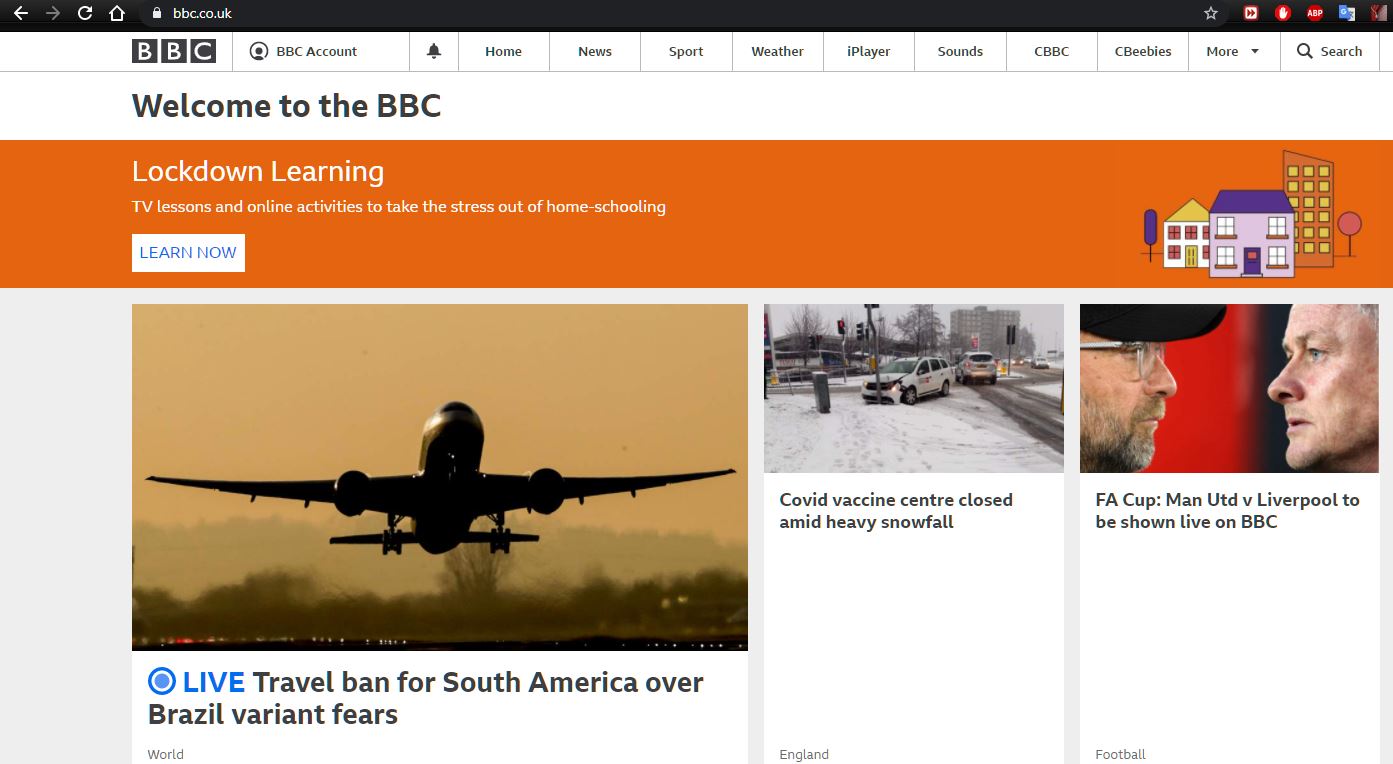
Looking at the BBC from North America

As an example, you can see that he BBC main page is quite different when connecting from North America versus the UK, as in the second instance a VPN was used to connect to the UK.  You will notice that the websites are similar but quite different.

Looking at the BBC Website using a VPN in the UK from North America

I hope this has helped give you a quick overview on VPNs, why people use them and can help you to identify if you wish to use one or not.  They are not awfully expensive for private individuals and are becoming much more popular.  Using one all the time, just connect to your own country, is not a bad way to go as it is still a more secure way to browse the web. There will be minor lag triggered due to the encryption, but you will not notice it under normal browsing conditions.  Most personal VPN companies offer a free trial, give it a spin!

@ericcrichardson

The gist of passwords

A password is something you have no doubt created dozens and dozens of times.  A password is a security mechanism to help secure access to a device or service allowing the correct individual to access the right device or service.

Something that is very worth mentioning is when correctly done passwords, as well as security in general, can feel a bit burdensome.  If it’s super easy to get access to a device every time, then it’s likely not very secure.

The password is a cornerstone of what we call “authentication” which is a systemic way to verify the identify of someone or a process. Authentication works with “Authorization” which is granting the correct level of access to the correct entity to the correct resource.  Imagine the example here: Jim signs into a web site at work, he must give a user ID and Password thus authenticating, then he is authorized, and he is only given access to the websites he should have and cannot see HR websites for example.

Some easy to remember DO and DON’T items regarding passwords:

The “Don’t” list

  • Do not use the same password twice, but absolutely you must make each E-mail password unique as well as anything else sensitive such as Banking etc.
  • Do not use a ‘familiar’ name, such as your spouse, child, pet etc. in your password.
  • Do not write a password list and save it in a cloud service, because if that one password gets compromised then all your passwords are suddenly compromised

The “Do” list

  • Do change your password regularly, at least every month or two—yes, every single one and yes, it is annoying to do so
  • Use strong passwords—a strong password is long, has a mix of capitals and lower cases, numbers and special characters (for example “hello” is a bad password but “DK$^$)456f;aef” is a much better one—problem is the good ones are hard to remember
  • Do write passwords down, yes in a notebook in a safe space.  I have one “Secure” notebook I hand write passwords down. It is not online or on any device, and the notebook is hidden on a wall of bookshelves I have in my office. Yes, it’s not very portable as it never leaves the house, but it’s a good emergency back up if I can’t remember.
  • Do use at least 8 characters but 10 or more are always better

What do I do? I have a base password which I modify for every website/service/app I use following a strict algorithm so I can figure out what my password is depending on what I am doing. I change the base password often.

Other authentication opportunities include biometric (a retina, fingerprint etc.) something that makes you uniquely you. 

The ultimate rule: Use common sense with a dash of prudence

You may remember the wonderful Mel Brooks movie where the bad guy staters that “12345” is his password on his matched luggage after someone states that is the password an idiot would use.  Well, it is one of the most used passwords and it is bad so do not use it, avoid the “obvious” passwords.

There are many lists of “worst” passwords but “12345” or similar list of sequential numbers is at the top of the list followed by “password”.  With a bit of effort and careful tracking you can have a system to support your passwords.

We know that if it is a bit of a pain in the backside. Yes, it is frustrating to have to change a password, and it can be equally frustrating when you loose track of what password you use for what website or service, but that makes it far harder by the bad guys.  Remember your password can be compromised by hackers attacking other websites, through no fault of your own your user ID and Password can be in the hands of these people. By enforcing password segregation and strong passwords you can keep exposure to a minimum therefore your accounts will remain much safer!

Being a Business Architect and battling “Hollywood” decision making..


What I will hope to do with this blog over time is share some learnings about being a Business Architect as well as living in technology my entire life with over 20 years of experience professionally. Today I’ll talk very briefly about architecture as well as talk about how decisions are made and the impacts of them.


I’m not going to give a text book definition of Business Architecture here, truth is there is no hard and fast official globally accepted definition. There are many frameworks, many organizations out there that’ll do that for your. Some of them even agree on a few points!


The whole “Architecture” space is a bit of a synonym soup. Business Architects understand business processes to identify and give their company the best chance to advance an opportunity of some sort. Frequently it means mapping out processes but it’s also so frequently understanding the technologies used.   You can be an EA (Enterprise Architect) IA, (Information Architect), SA (Solution Architect), etc etc…   to me it’s all about the business and really the master umbrella is BA.. Feel free to disagree.


So why have any kind of an Architect in an organization? Making data rich decisions versus making an emotional one, or worse yet a “Hollywood” decision.

A Hollywood decision is a goal set that is clearly beyond difficult, or in fact impossible.   There’s a great example of Collins and Porras’ “BHAG” or “Big, Hairy Audacious Goal”. From “Built to Last: Successful Habits of Visionary Companies”– they posed that a BHAG should be something like an aggressive mission statement (such as Microsoft’s old company mission of “A computer on every desk and in every home“, or Google’s “Organize the world’s information and make it universally accessible and useful“– clearly missions they both were very successful in bringing about.


Frequently management takes the notion of setting aggressive long term goals and translating them into Hollywood goals in the guise of a BHAG. An example could be the “Double or half” rule which is an arbitrary goal to double output of some sort or cut something bad in half, this is in my observation a Hollywood goal robed in a BHAG.


What’s the difference? Clearly a Hollywood approach as it has no science but a BHAG as articulated by Collins and Porrras’ does, that’s a great way to understand the difference between what BA’s do and what “management” does. BA’s are here to guide decisions to help management set aggressive goals that won’t do long term harm to a team. Sometime projects go bad and they end up in a “Death March” (Coined by Yourdon in ’99) where the team has a rapidly approaching due date and is working faster and faster while working longer and longer. Any Hollywood goal puts the danger of a death march on the radar, while using smart data rich decision making and opportunity identification helps to prevent it.


So to sum up this entry what do BA’s do? BA’s help prevent the old axiom of “Lack of planning on your part does not mean an emergency on my part…” from occurring!


In upcoming entries I’ll talk to proactive vs reactive decisions, goal setting and alignment, managing data, identifying decision makers and supporters, mapping realization of value as well as analytics..


Please feel free to suggest other areas you’d like to see covered!


References-


Collins, J. & Porras, J. (1994). ‘Built To Last.

Yourdon, E. (1999). Death March: The Complete Software Developer’s Guide to Surviving ‘Mission Impossible’

http://research.microsoft.com/en-us/

http://www.google.com/intl/en/about/company/


@ericcrichardson

Where do I come from???

What led me to technology as a career?

In the mid 1970’s when I was a kid, my father was working as an electrical engineer. He’s a HAM radio operator and like so many of them he liked to build electronics. As an EE what he could built at home was pretty impressive. 

What he began to build one summer looked to me like another radio to listen to the Voice of America, the BBC, or Tass from the Soviet Union. It was both funny and scary to a fourth grader to hear these great powers making fun of one another, but of course the cold war was not at all funny.

It didn’t take long to realize this thing wasn’t a radio, it had  two banks of little red lights (LED’s) with 16 switches under them and another row of 9 switches under those. The box came from a company called “MITS” and it had- what I thought- very futuristic lettering at the bottom.. “ALTAIR 8800 COMPUTER”.

Home Computer Genesis, that’s what I was witnessing. I “Helped” my dad, I had small hands and I could hold wire bundles while he soldiered.  Then I learned how to follow  a set of written instructions to flip those LED’s to make it do something.. Basically turn the LED’s on in  certain pattern. It was wonderful!  That set me on path, myself and two of my three brothers are in high tech to this day.

I come from a family of engineers, I don’t just mean my dad and brother. Several cousins, my grandfather, his brother, several of their cousins, my great grandfather, his brother their cousins.. Pretty as long as there has been an “electrical engineering” there has been a Richardson there.

My work has spanned from the early days of the Internet back in the mid 90’s when I recall trying to sell the idea of a ‘virtual walk through’ of a house on the market to Real Estate agencies. Just a bit too early in 1995.  in 1996 I wrote a book about programming web server applications and due to enthusiasm overcoming logic, I published a nifty little program that many folks took to help create anonymous re-mailers.. Which could have  kept the NSA confused today!  In the later 90’s I wrote about the potential of search engines and how they could be harnessed to give great information.  I also helped create some early websites focused on marketing by drawing “eyes” in via slick online shockwave games.

I then went corporate and built one of the first large scale software distribution sites tied to licensing entitlement in the early 2000’s,  I ended up moving to battling software piracy and through that received a patent that pretty much created what we all know as “Geo Blocking” in the Mid-2000’s. After impacting a few billion dollars worth of piracy I moved to help move product data mastering forward, and after a few years I moved back to IT to build a team of business and information architects focused on hardware, software, and services. 

I write, I teach, I solve, I try to laugh and make others laugh, but always I’m happy to be a “geek”. I come from a family of geeks, we were there through the last century taking part, leading, or supporting many of the great technological leaps forward.   It’s been a great ride so far!

Image

@ericcrichardson